One app runs your entire review cycle.
Manager Suite AI optimizes your team's review cycle, including AI-drafted first passes, one-click reviews, instant notifications, and everything in one place, so you spend less time running admin and more time growing the business.

Everything, one place
Every person's review stage, every upcoming 1:1, every to-do — on one dashboard instead of a stack of spreadsheets and email threads.
Nothing slips through
You're emailed the instant a self-eval comes in, so no review sits waiting in a folder you forgot to check.
Onboard in a click
New hire, new checklist — automatically, with progress visible right from the dashboard.
Private until you're ready
Your notes and ratings stay yours alone until you choose to reveal them together, in the 1:1.
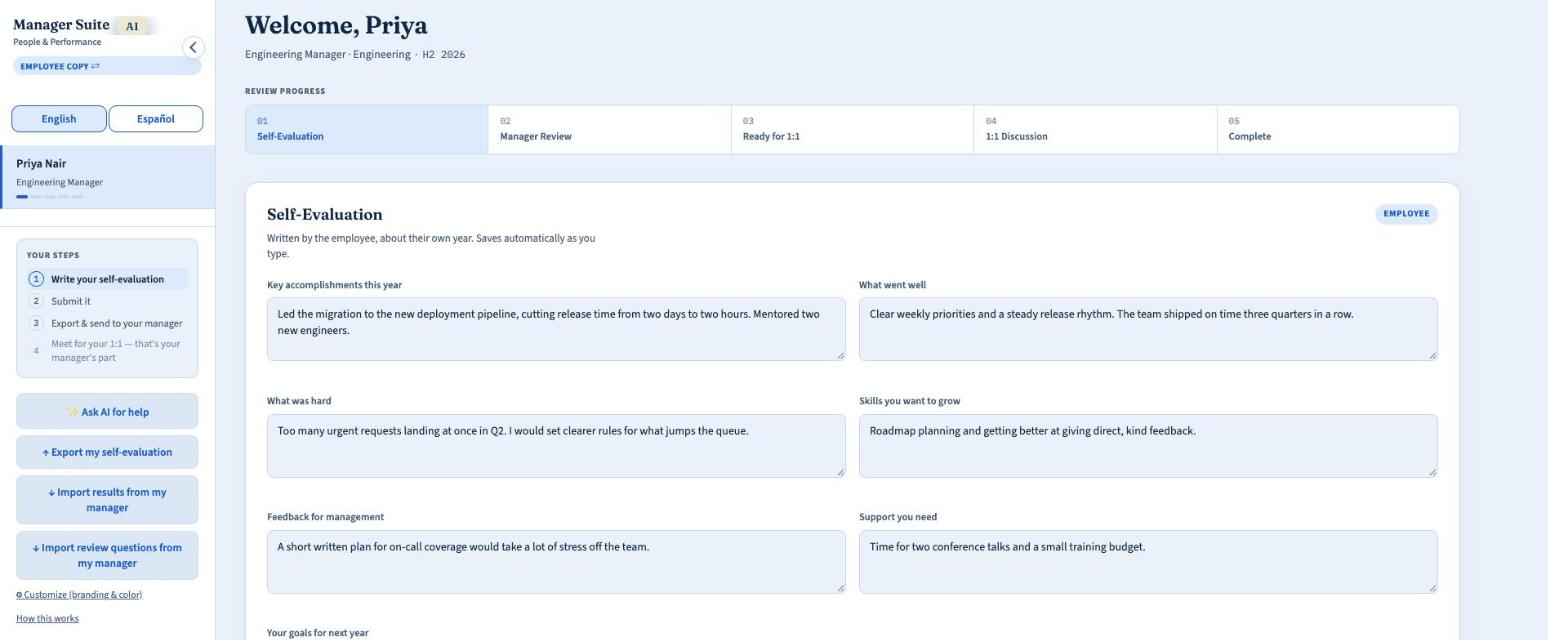
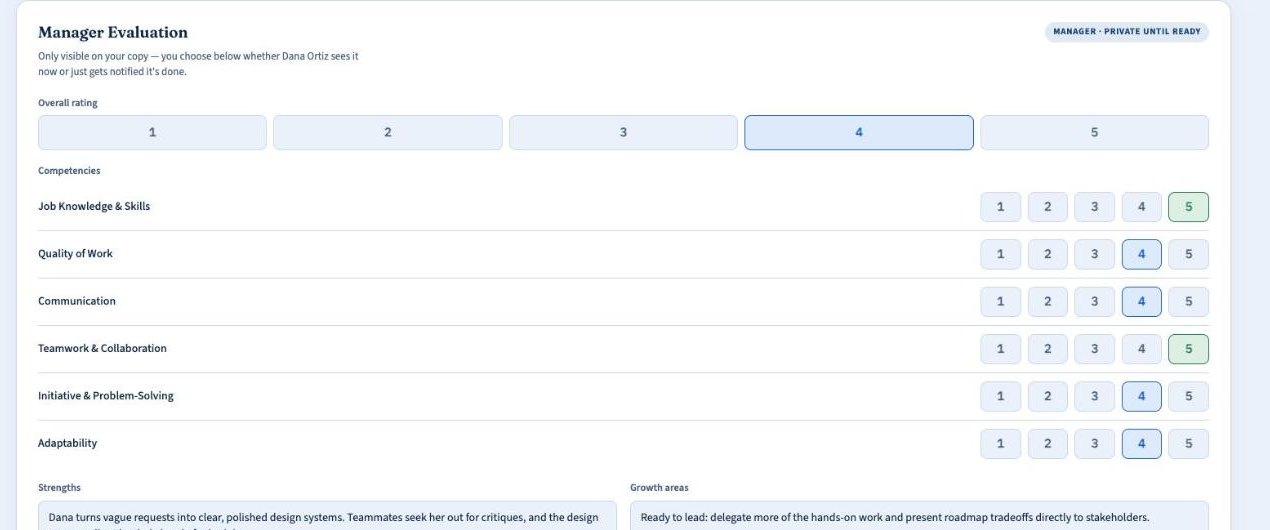
A short walkthrough of the new Manager Suite AI: your home page, your team, the self-evaluation each person fills out, your private review, and your 1:1s. Screens use sample people and data.
“This is the system for teams that have outgrown informal Slack check-ins, but refuse to buy bloated enterprise HR software.”
Reviews & 1:1s
The same self-eval, manager review, and 1:1 discussion log as the core app, with a stage tracker for where each review stands.
Send & receive
Send one review link or bulk-send to your whole team — your employee fills it and submits with one click, no exporting or attaching.
Real-time notifications
You're emailed the moment a self-eval comes in, so nothing sits waiting in a folder you forgot to check.
You control visibility
Write your side whenever you're ready, and release it to the employee on your own timeline — not automatically.
AI-assisted drafts
Optional — connect your own OpenAI, Anthropic, or Gemini key and get a suggested first draft of your review, grounded in what the employee wrote. You always review and edit before saving.
Bulk send to your team
Save contacts once, then select as many as you like and send every review link in a single click.
Built on the same file
Same review structure, same privacy-first philosophy as Manager Suite AI — just hosted, so your team can reach it from anywhere.
Skill Match NEW
Describe the role or project you need to fill, and get a ranked shortlist of qualified people already on your team, based on their review history, qualifications, skills, and certifications — not a job posting.
Ready-made question sets, or write your own
Start from a template built for how your team actually works, then edit any question, add your own, or drop the template entirely — whatever you type stays exactly as you wrote it, in either language.
- Retail & hospitality — shift coverage, customer interactions
- Healthcare — patient care, compliance, credentials
- Construction & field services — site safety, project milestones
- B2B & professional services — client outcomes, account growth
- Tech & software teams — delivery, code quality, ownership
- Manufacturing & logistics — throughput, safety, quality control
- Nonprofit & education — program impact, community reach
- Or anything else — general-purpose template, fully editable
Get Manager Suite AI for your team
Tell us a bit about your team and we will walk you through pricing and get you set up.
- Everything in Manager Suite AI, hosted for you
- Hands-on help while you get started
- A redesigned Home that shows what needs you first, with a menu you can rearrange
- AI built in: help drafting reviews, and Skill Match to find the right person for a role
- Instant Slack and Microsoft Teams alerts, in English and Spanish
- Add your people right in the app, on phone or laptop
The job is leading people. We handle the rest.
Manager Suite AI is the calm, all-in-one place for reviews, 1:1s, time off, policies and everything else that comes with running a team, so the busywork stays out of your way.
Small teams deserve great management, without an HR department.
Most people-management software is built for big companies with a procurement team and a long sales process. But most managers are running a team of five, fifteen or fifty, and they need to get reviews done, remember the 1:1s, approve time off and keep good records, all without a long setup.
So we built Manager Suite AI for the person actually doing the managing. You sign up, add your team and start the same day. Our mission is simple: help every manager lead their people well, with less admin and more time for the conversations that matter.
Managers first
Built for the person doing the managing, not for a procurement team. Plain words, short setup, and features that earn their place.
Private by default
Your notes stay private until you choose to share them. Performance notes are never shown to employees, and we never sell or share your data.
We actually ship
Feedback goes to a real inbox and a real person reads it. Improvements land often, with a short What's new note that tells you what changed.
Everything a manager needs, in one place
Team Reviews & 1:1s
Self-evaluations, private manager reviews and a guided 1:1 agenda, with full history for every person.
Handbook & Performance Notes NEW
Publish policies, see who has acknowledged them, and keep private coaching notes with follow-up dates.
Onboarding & Offboarding
30/60/90-day checklists for new hires and an exit checklist so nothing slips.
Time Off NEW
Requests, approvals and balances in one place, with approved days on your calendar.
Team Directory & Celebrations NEW
Contact details, work anniversaries and optional birthdays, with a nudge so none slip by.
Hours & Pay
Log hours or salary per employee, with annual totals calculated for you.
Skill Match & Hiring NEW
Find the right person on your team for a role, then draft the job post and track candidates.
Ask AI
An assistant that knows your team's reviews, goals, time off and policies. Bring your own OpenAI, Anthropic or Gemini key.
Notes, Goals & Calendar
Timestamped notes, growth plans and career paths, with every deadline on one calendar.
Slack & Teams Notifications
Get a message the moment someone submits a self-evaluation, plus a daily summary.
Your Brand, Your Words
Add your branding and write your own review questions in your own language.
Secure & Passwordless
Sign in with an emailed link or code, add an optional PIN lock, and share view-only links.
Managers are asked to do a lot. Lead the team, have the hard conversations, keep the records straight, and still get their own work done. Most tools meant to help were built for big companies, and they end up as one more thing to manage.
Manager Suite AI is the opposite. It is one calm place for the things every manager has to do, set up in minutes and built for small teams. Your notes stay private, and if you want AI you bring your own key, so we never see it.
Every message sent through the Feedback button reaches me, and it decides what we build next. Thank you for trusting us with your team.
Built with help from people we love
Manager Suite AI and Business of One were shaped by the people closest to us. They shared ideas, tested early versions and told us honestly what felt right. We are grateful to every one of them.
Josh F. Arias
Josh founded Manager Suite AI around a simple belief: small businesses deserve powerful tools without the complexity, bloated features, or enterprise-level costs. Driven by a passion for simplifying how people work, he built Manager Suite AI to help businesses operate smarter and Business of One to bring that same philosophy to entrepreneurs and individuals. His mission is to make technology work for people—not the other way around.
David A.
As a co-founder of Manager Suite AI, David has played an instrumental role in turning ideas into reality. From shaping early concepts to helping bring key initiatives to life, his contributions have helped define the company's direction and foundation. His involvement reflects the collaborative spirit and practical thinking driving Manager Suite AI forward.
Kelvin F.
Kelvin has contributed to the evolution of Business of One by testing its applications, exploring their potential, and offering thoughtful feedback. His ideas and hands-on perspective have helped refine the experience and strengthen the vision behind the products. His support reflects the value of building technology with real-world needs in mind.
Michael D.
Michael has played a valuable role in helping transform early ideas into clear concepts and actionable direction. He has contributed to the creative process behind Manager Suite AI. His involvement reflects the importance of collaboration and turning good ideas into meaningful progress.
Want to see it in action?
Book a short demo and we will show you how it fits your team.
Know exactly where your money goes.
Business of One is for solo founders, freelancers and side hustlers. See what is left this month, what is coming up, and how your business is doing, in about five minutes a week. No bank linking and no accounting degree. Ask AI is built in, so you can ask how to save more and earn more.
Already a member? Open the app.
Can I afford it? and Savings
Thinking about a house, a car, a vacation, a ring or a wedding? Get a plain answer from your own numbers: Easy, Comfortable, Stretch or Too much right now. Then see whether it is a smart move, what it costs in total with interest, and what would make it work.
Put your savings in pots, see how many months of expenses they cover, and let every answer use the same numbers. Whatever you enter once shows up everywhere, so every tab always agrees.
Estimates to help you think it through. Not financial advice.
Start your 60 days free


Sign up
Your name and email. Phone and company are optional.
Confirm your email
We send a 6-digit code. Type it in and you are in.
60 days free
Your free time starts when you confirm. Everything is unlocked.
Keep going
On day 61 it is $10 a month through Stripe. No contracts.
One calm place
One number for what is left this month, plus the next few things coming up. Open it, know where you stand, close it.
Work money and your own money, side by side
Budgeting apps forget that you also run a business. Here, your business and your personal money live together but never get tangled.
Private by default
No bank linking and no handing over a bank login. Your numbers stay yours, and we never sell or share your data.


Today at a glance
Your pay, what is left to spend, your bills and your business profit, with the next few things coming up.
Money in and out
Add income and spending in two taps. Mark each one Business or Personal so the two never get tangled.
Your business, simply
Money in, money out and profit for your business, kept apart from your own money. Track each property, client or product.
A budget that fits your pay
Enter your take-home pay, set your plan, and change it any time. Log what you spend on groceries, gas, subscriptions and more, and see what is left.
Can I afford it?
Check a house, a car, a vacation or any big purchase against your real numbers. Get a plain answer, whether it is a smart move, the total cost with interest, and what would make it work.
Savings in pots
Sort your savings into pots, like an emergency fund, a house and a trip. See how many months of expenses they cover and when each goal gets there.
Your money map
See where every dollar went. Your income flows into categories like rent, groceries, gas and subscriptions, with bigger bands for bigger amounts.
Pay Lens
Enter your pay however you get it, hourly or per paycheck, and see it as yearly, monthly, weekly and hourly numbers.
Bills and reminders
Bills with due dates and a coming-up list, so nothing slips.
Landlord tools
Own a rental? Track rent due and received, repairs and work done on each property, and profit or loss for every place you own.
Ask AI, built in
Ask about your own numbers in plain English and get ideas to save more and earn more. You bring your own AI key, so we never see it.
Ask AI lives inside Business of One and reads your own numbers, so you get answers about your money, not generic tips.
Example conversation · example numbers
- Raise Oak Ave rent. A 5% increase adds about $50 a month (an estimate).
- Chase the $1,200 not marked paid. That is more than your profit so far this month.
Finds where to save
Spots overspending, subscriptions switched on and bills that are heavy next to your pay, then suggests a realistic amount to set aside.
Finds ways to earn more
Pricing and rent, costs to trim, late payments to chase and growth ideas that fit your kind of business.
You stay in charge
Bring your own key from Anthropic, OpenAI or Google. It stays on your device and we never see it. You pay your provider directly.
Suggestions only, not tax, legal or financial advice.
Not another accounting tool
No double-entry, no jargon. If you've ever opened bookkeeping software and closed it again, this one is for you.
Not another budgeting app
Budgeting apps forget that you also run a business. Here, your work money and your own money live side by side.
No bank linking
Add things yourself or import a file. No broken syncs, and no handing over your bank login.
Calm, on purpose
No dashboards full of charts you never asked for. A few clear things, shown clearly.
Business of One
or $100 a year, which is two months free
- Your first 60 days are free, with everything unlocked
- Money, Savings, Can I afford it?, Business, Pay Lens and Ask AI, all in one app
- Works on your phone and your laptop, in English and Spanish
- Cancel any time. You can always sign in to view and download your data
- Already using Manager Suite AI? Business of One is included
When does my free time start?
When you confirm your email with the 6-digit code. You get 60 full days, then it is $10 a month or $100 a year.
Do I need a card to start?
No. You only add a card, through Stripe, if you decide to keep going after your 60 days.
What happens after 60 days?
You can still sign in to view and download your data, but adding or changing things needs a subscription.
Can I cancel?
Yes, any time. No contracts and no cancellation penalties.
Is my data private?
Your numbers are saved to your own account. If you add an AI key, it stays on your device.
Is Can I afford it? financial advice?
No. It compares a purchase with the numbers you enter and shows estimates, so you can think it through. It does not replace a financial professional.
Already using Manager Suite AI?
Business of One is included. Contact us and we will turn it on for your email.
Hiring your first person?
When your business grows past just you, Manager Suite AI is the next step: team reviews, 1:1s, onboarding, time off and more, with the same sign-in and the same look.
Business of One is a bookkeeping and planning tool. It is not tax, legal or financial advice, and AI answers are not financial advice either. Screens and numbers on this page are sample data for illustration only.
Trust & Security
Your team's data and your own money numbers are sensitive. Here's exactly how we protect them — and what we do (and don't) have access to.
Data Encryption
- Encrypted in transit — every page and request runs over HTTPS
- Encrypted at rest in our database
- No sensitive data is ever stored in plain text
Your AI Key, Your Control
- Bring your own OpenAI, Anthropic, or Gemini key
- Your key is used directly by your session — it never touches our servers
- We have no access to the AI account behind it
- Works the same way in Business of One — the key stays in your browser
Business of One
- Your money numbers are private to your account
- Kept separate from your Manager Suite AI records
- No bank logins or account numbers collected, and no money moves through the app
- Paid plans are handled by Stripe, so we never see your card number
- Optional PIN locks the app on your device (a simple lock, not bank-level security)
Privacy & Terms
Read exactly what we collect, how it's used, who (if anyone) it's shared with, and the rules for using Manager Suite AI and Business of One.
Already a customer? Get back in.
There's no password to remember — enter the email you used to sign up and we'll email you a fresh link straight to your dashboard.
Business of One has its own sign-in. Open it and enter your email. First time here? Use the access code we sent you, or request access there and we will review it.
Open Business of OneFirst time here? You'll need the access code we gave you when you signed up — enter your email and we'll prompt you for it.
Enter your work emailThe same one you used to send reviews, or a new one if this is your first time.
Get a link by emailNo password to set or forget — one click opens your dashboard.
Pick up right where you left offYour contacts and every review you've sent are still there.
Is my team's review data private?
Only you and the employee on each review can see it. Your manager dashboard is reachable only with your emailed link, and an employee's self-eval is only visible to them and to you until you release your side.
What if I lose my dashboard link?
Come back here, enter your email, and we'll send a fresh one. It's tied to your email address, not to a device or browser.
Do I need the offline app too?
No — Manager Suite AI works entirely hosted. If you also use the offline single-file app for goals, 1:1s, onboarding, or Hours & Pay, they're separate but built on the same review structure.
Questions, feedback, or something's off?
This goes straight to a real inbox, not a ticket queue. Bug reports, feature ideas, purchase questions, or just "how do I…" — all welcome.
Tell us about your team, and we'll take it from there.
No sales script, no hold music — just a quick note to a real person who'll follow up with pricing, a demo, or whatever you actually need.